

Writer: Gerri Detweiler


Editor: Jon McDonald


Reviewer: Ashley Fricker

Opinions expressed here are ours alone, and are not provided, endorsed, or approved by any issuer. Our articles follow strict editorial guidelines and are updated regularly.
My new credit card came with the offer to create unlimited virtual card numbers. While I’ve known about virtual card numbers for several years, I didn’t start using them until I received that new card a few months ago.
After giving them a try, I understand why they are popular.
About 40% of cardholders have used virtual card numbers in the last six months, mainly to pay for online purchases and subscriptions, and 65% of consumers say they’re likely to use one in the next six months. They provide an additional level of safety and control, and they are easy to use once you get the hang of it.
Just like you might have a separate email you use to sign up for coupons so you don’t have to give out your main email address, you can use a virtual card number to shop online without giving away your real card number.
And while they are designed for online shopping, some cardholders use them for just about everything. And I’ll tell you everything you need to know to start using virtual credit card numbers quickly and safely.
How to Use a Virtual Card Number
Virtual card numbers have become a big part of some cardholders’ everyday purchase strategies.
One Redditor says: “…nobody has my real card number — even for doctor co-pays I bring in a 3×5 card with a virtual number on it, and for hotels and car rentals I sign up for their ‘club’ or whatever so I don’t need to present a physical card.”
Before we talk about how to use a virtual card number, it’s worth noting that issuers may use the term “virtual card number” in different ways.
U.S. Bank, for example, uses it to describe an option that lets you use your card number when you don’t have your physical card. But it doesn’t create a unique number different from the number on your physical card.
American Express offers its consumer cardholders virtual card numbers that can only be used with a Google Chrome browser on desktop or Android mobile devices, and, where available, in Android apps. You must be logged into your Google account to use one, and your information is shared with Google.
While these can be helpful, some of the more robust virtual card numbers allow you to create a unique card number along with features like limiting the use of that card to a specific merchant or spending limit.
That’s the type of virtual card number I will focus on, and here are the steps you can take to get started:
Step 1: Find Out if Your Issuer Offers Virtual Cards
Log in to your card’s online account or the mobile app and search for “virtual card number”. The two major card issuers currently offering versatile virtual cards for consumer cards (rather than corporate cards) are:
- CapitalOne
- Citi
If you’re looking for other issuers, check out our list of the best virtual card accounts.
Step 2: Create a Virtual Card Number
The card issuer will offer step-by-step instructions for creating your virtual card. Here’s an example from Capital One:
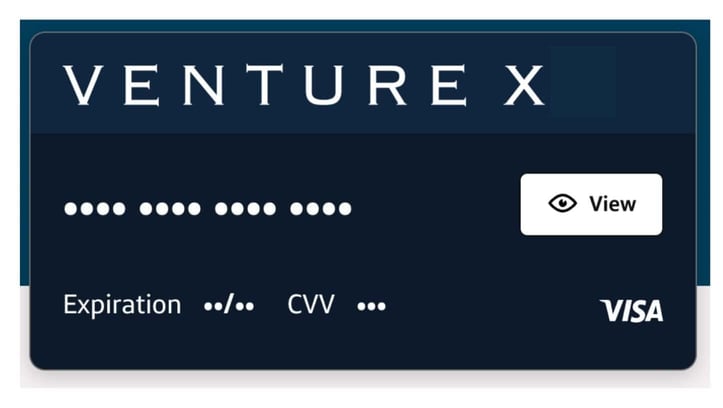
Click on the “view” button on the card to show the card number, expiration date, and security code.
The other option Capital One offers is to create virtual card numbers for specific merchants or purchases. You can limit that card number to a single use and even schedule a date for that number to expire.
Step 3: Use Your Card Number For Purchases
Copy the number and use it for purchases just like you would with any other card number. Your purchases appear on your statement, just like those made with your physical card.
You can also download the Eno from Capital One Chrome extension for easier online shopping. It provides a unique card number for each site when you shop online.
Why Use a Virtual Card Number
Here are the main benefits of virtual card numbers, though again I’ll remind you that features can be different from issuer to issuer.
Protect Your Card Number
Get a randomly generated number to make purchases without revealing your actual card number.
If one of these numbers is compromised, you may not have to cancel your original card and get a new one.
Set Limits On Use
Use them for one-time purchases, for a limited period of time, with a specific merchant, or for limited amounts, depending on the controls offered by the card issuer.
This feature makes them popular for use with subscriptions. If you want to take advantage of a trial subscription without worrying that you may forget to cancel it, a one-time-use virtual card number may make that easier.
Recently, I wrote about a parent whose child ran up hundreds of dollars in charges for online games. Virtual card numbers may prevent this type of problem by allowing you to limit their use.
Start Spending Right Away
If your issuer offers a virtual card number, you may be able to access it while you wait for a physical card. If you’re planning a major purchase or want to get started spending toward a sign-up bonus, this can be helpful.
If your issuer offers virtual cards, you may want to try using one the next time you make an online purchase. Once you’re comfortable using them, you may find yourself preferring them for future online purchases.
Virtual Card Numbers vs. Digital Wallets
Digital wallets like Apple Pay or Google Pay use tokenization to create numbers that are not viewed by the merchant. But you won’t have the same level of control as you may with virtual card numbers.
Still, if you don’t want to use your actual credit card at checkout, your digital wallet can make it easy to make purchases using your smartphone, and your real credit card number will remain private.
Tips for Using a Virtual Card Number
If your card issuer lets you create unique numbers and name them, pick the name carefully. “Online shopping Jan 2026” isn’t nearly as helpful as a name that tells you where you used it and for what purpose.
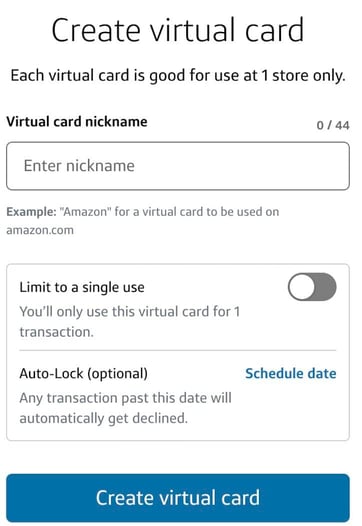
For example, you could include the name of the site, plus a descriptor like trial, subscription, or one-time purchase.
Even with the added security these card numbers offer, you want to be careful about how and where you use them. Again, unauthorized credit card use is limited to $50, but it’s always a hassle when your credit card is compromised.
Shopping on public wifi is always risky, for example, as is online shopping on unsecure sites.
A virtual card number enabled for one-time use may be safer to share with a family member than the physical card. Just remember that once you authorize someone to use your card, you can no longer dispute their purchase as unauthorized.
And despite the promise of greater security, some users have complained that fraudulent charges on virtual cards were difficult to dispute, or that misuse of a virtual card number required them to cancel the physical card (or vice versa).
Also, keep in mind that some transactions may require you to show the card you used to make the purchase, along with identification.
This is sometimes required for airline tickets or other tickets. So, if that’s the case, use your physical card number.
Virtual Card Numbers Add Security, But Use Them Responsibly
It’s always a good idea to set up alerts for your credit card purchases and to review your credit card statements regularly to make sure your spending is still in line with your financial goals.
Virtual credit card numbers can’t keep you from busting your budget by overspending, but they can keep your credit card information safer.
While you should always keep your defenses up when shopping online, a virtual credit card number can provide you with a little more peace of mind.
Editorial Note: Our site content is not provided or commissioned by any credit card issuer(s). Opinions expressed on CardRates.com are the author's alone, not those of any credit card issuer, and have not been reviewed, approved, or otherwise endorsed by credit card issuers. Every reasonable effort has been made to maintain accurate information; however, all credit card offer details, including information about rewards, signup bonuses, introductory offers, and other terms and conditions, is presented without warranty. Clicking on any offer on CardRates.com will direct you to the issuer's website, where you can review the current terms and conditions of the offer.
About the Author